๐Ÿ“ž
PhoneBurner Dial Session Companion
Install Free
Free Chrome Extension

Dial from your CRM.
Stay in your CRM.

The free Chrome extension that launches PhoneBurner power-dial sessions from inside HubSpot, Close, Apollo, Salesforce, Pipedrive, AgencyZoom, and more. Reach 4ร— more people per hour without leaving your CRM tab.

โ˜…โ˜…โ˜…โ˜…โ˜… Built by PhoneBurner โ€” 4.7 on G2, trusted by 3,000+ sales teams
Works where you already work

One extension, every CRM you care about

From full API integrations to generic page-scan mode, the extension meets your CRM where it is. Click any to jump to the details.

Looking for Zoho or monday.com? PhoneBurner has dedicated integrations for those โ€” see Zoho CRM and monday.com.

Three ways to launch

From a list view to a 500-contact session in one click

โœ“

Select & Launch

Pick the contacts, companies, or deals you want to dial from any CRM list view and launch instantly. Works across HubSpot, Close, Apollo, Salesforce, Pipedrive, AgencyZoom, and more.

โ‰ก

Launch from saved list

Pick a saved HubSpot list from the dropdown and dial up to 500 contacts or companies in a single session. No CSV, no export, no cleanup.

โšก

Task Queue dialing

Dial through your HubSpot task queue and have each task close the moment the call ends. Built for the way SDR teams actually work.

Live Follow Widget

Your CRM follows along on every call

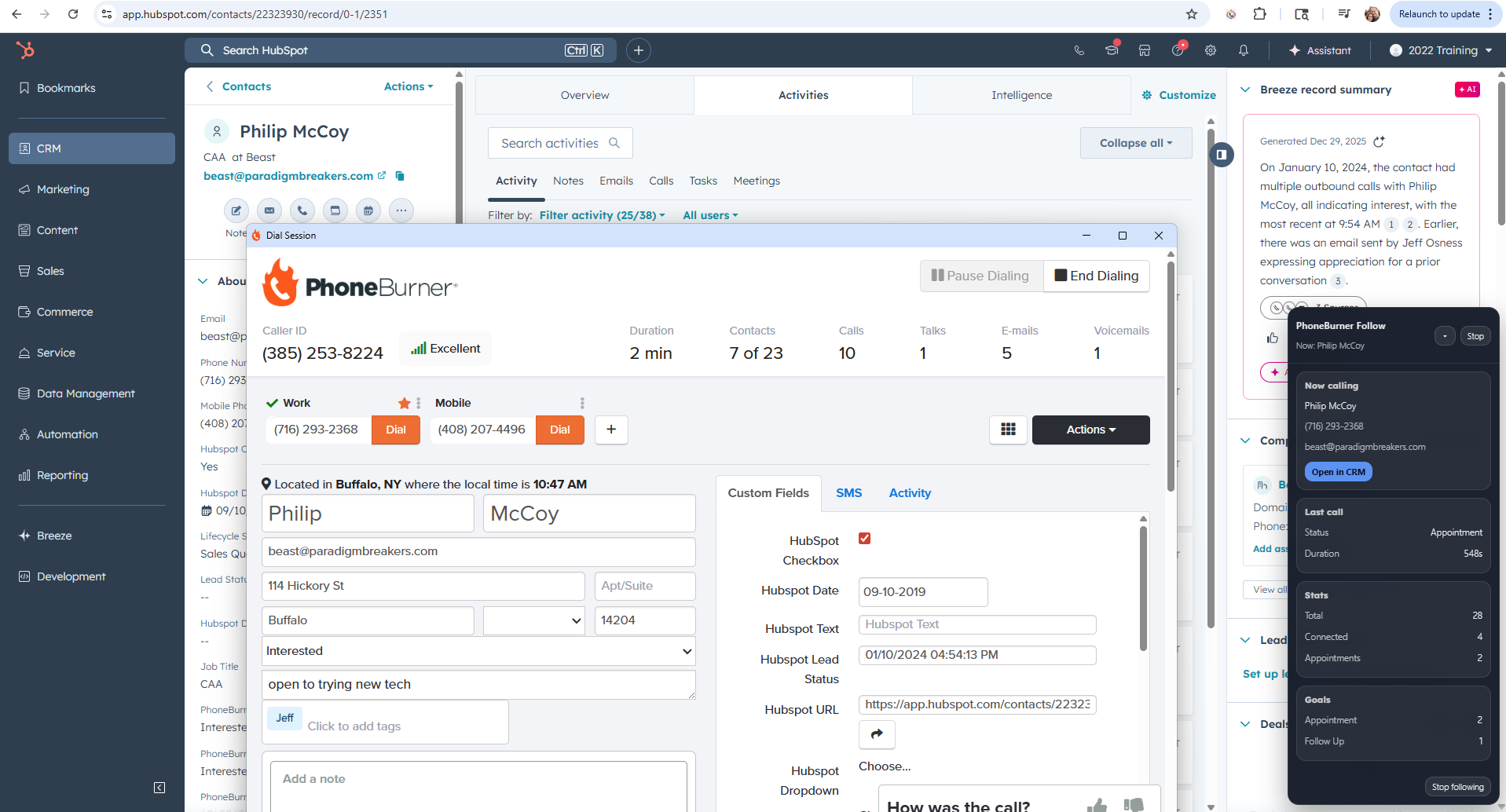
As PhoneBurner dials, the extension's overlay shows the active contact, the live call timer, and session stats โ€” and it brings your CRM tab to the right record so you're never digging for context mid-conversation.

  • Brings your CRM tab to the active contact's record
  • Tracks current call duration, dispositions, and session totals
  • Expand or minimize on demand โ€” never in the way
  • Zero setup โ€” works the moment a session starts
The Follow widget overlaid on a HubSpot contact record showing an active PhoneBurner dial session with appointment outcome
vs. CRM click-to-call

Why teams switch from built-in calling

Most CRMs include a basic click-to-call. It's fine for the occasional call. For real outbound volume, PhoneBurner + the extension is in a different league.

PhoneBurner + Extension Your CRM's built-in click-to-call
Contacts per hour 60โ€“80 (power dialing) ~10โ€“15 (manual)
Dialing style Power dialing, one-after-another One call at a time, manual
Monthly minute cap Unlimited Plan limits apply
Pre-recorded voicemail send (one click) โœ“ โ€”
Spam-protection number rotation โœ“ โ€”
Call activities logged to your CRM โœ“ Limited / manual
Delay-free connections โœ“ (no awkward pause) โ€”
Detail by CRM

What you get for your specific CRM

Integration depth varies by CRM. We support three levels โ€” full API (Level 3), optimized scraping (Level 2), and generic scan mode (Level 1) โ€” so the extension does as much as possible for every CRM, not the lowest common denominator.

HubSpot Level 3 ยท Full API

The deepest integration we offer. Built for high-volume SDR and account-management teams running their entire pipeline through HubSpot.

โ–ฒ Watch the HubSpot Task Queue dialer in action โ€” launch from a tasks view, dial through, watch tasks close as each call ends.

  • Launch from any list view โ€” contacts, companies, or deals. Select records, click Launch.
  • Launch from saved HubSpot lists โ€” pick from your existing saved lists and dial up to 500 records in one session, with no CSV export.
  • Launch from your HubSpot Task Queue โ€” open any tasks view (queues, filtered views, due-today, custom), pick which task rows to dial (or dial them all), and run the queue through PhoneBurner.
  • Close tasks as you dial โ€” when a call ends, the originating HubSpot task is marked Completed in your HubSpot account. If the contact has multiple open call tasks, all of them get closed on a single dial.
  • Discovers your phone fields โ€” including custom phone properties โ€” and lets you set a preferred primary phone in Settings.
  • Follow widget keeps your HubSpot tab in sync with the active contact's record as PhoneBurner moves through the session.
  • Call activities log to HubSpot via the PhoneBurner โ†” HubSpot integration in your PhoneBurner account.
  • OAuth authentication โ€” connect securely with one click; no copy-pasting tokens for HubSpot.
See the full HubSpot integration on phoneburner.com โ†’

Close Level 3 ยท Full API

  • Launch dial sessions from Close contacts or leads โ€” works on both the Contacts page and the Leads page
  • Phone and email fetching via the Close API โ€” no scraping
  • Call activities logged back to Close, including disposition, custom outcome, and recording link
  • Note activity logged separately โ€” any notes typed during the call also appear as a stand-alone Note on the lead, in addition to the call activity itself, so they're easy to find later
  • Custom Close Outcomes matched by name (case-insensitive) or created from PhoneBurner statuses โ€” no Close-side setup required
  • OAuth authentication โ€” connect securely with one click

Apollo.io Level 3 ยท Full API

  • Launch dial sessions from the Apollo People page โ€” select contacts and dial
  • Dial from sequence call tasks โ€” pick a sequence, filter by due tasks, power-dial
  • Filter tasks by due today, overdue, or all open
  • Navigate to Apollo contact profiles during calls โ€” the Follow widget keeps the Apollo tab in sync
  • OAuth authentication โ€” connect securely with one click
  • Note: call-activity logging back to Apollo is on the roadmap and ships when there's sufficient customer demand. Today, PhoneBurner's main app retains the full call record.

Salesforce Level 2 ยท Optimized

  • Optimized page scraping tuned for Salesforce list views
  • Select rows (checkbox) and launch a dial session for the selected contacts
  • Follow widget keeps the Salesforce tab in sync with the active call
  • No OAuth required โ€” works the moment you load a list view

Want fully native Salesforce integration? PhoneBurner offers a dedicated Salesforce package that runs as a first-class app inside Salesforce with full activity logging and deeper data sync. See the PhoneBurner Salesforce package โ†’

Pipedrive Level 2 ยท Optimized

  • Optimized page scraping for the Pipedrive Persons list
  • Dial all visible person rows with one click
  • Follow widget tracks the active contact in Pipedrive during the session
  • No OAuth required

AgencyZoom Level 2 ยท Optimized

Built for insurance agencies working task queues at scale. Turn your AgencyZoom task list into a PhoneBurner power-dialing session in one click.

  • Launch from your AgencyZoom task list โ€” one click builds a dial session from every visible task's lead
  • Automatic dedup โ€” a lead with five open tasks appears once in the dial session, not five times
  • Follow widget navigates to each lead's page in AgencyZoom during the call โ€” the "Mark Completed" and "Mark Completed + Note" buttons on the open task are one click away when the call ends
  • Selection-aware โ€” check specific task rows to dial only those, or leave nothing checked to dial the whole visible queue
  • No OAuth required

Don't see your CRM? Level 1 ยท Generic

The generic page-scan mode works on most table or list-based CRM pages โ€” even ones we haven't specifically optimized for. Install the extension and try it on your CRM. If you're a larger team that wants deeper Level 3 support for a specific system, get in touch โ€” we add new providers regularly.

Using Zoho or monday.com? Those CRMs are served by separate PhoneBurner integrations rather than this extension โ€” see Zoho CRM or monday.com on phoneburner.com.

Setup

Up and running in under 5 minutes

Install the extension

Add the free PhoneBurner Dial Session Companion from the Chrome Web Store.

Get your PhoneBurner PAT

Log in to PhoneBurner, go to Settings โ†’ Personal Access Tokens, and copy one.

Paste your PAT

Open the extension popup, paste your PAT, and click Save. Done.

Open your CRM & launch

Navigate to any supported CRM, click the extension, and start dialing.

FAQ

Frequently asked questions

Do I need a PhoneBurner account?

Yes. The extension launches dial sessions through your existing PhoneBurner subscription โ€” it doesn't replace PhoneBurner, it makes your CRM able to drive it. If you don't have an account yet, start a free trial at phoneburner.com.

How is my PhoneBurner credential stored? Is it secure?

Yes โ€” and more carefully than most extensions. When you save your Personal Access Token, it's transmitted over HTTPS to the extension's backend servers and stored with strict owner-only file permissions (mode 0600). Your browser does NOT keep a copy of the token. The browser only stores an anonymous lookup key (a random UUID); the actual token lives server-side. This means a compromised browser profile or another extension can't read your PhoneBurner credentials.

How do call logs get into my CRM?

It depends on the CRM:

  • HubSpot: Call activities log via the existing PhoneBurner โ†” HubSpot integration in your PhoneBurner account (activate it once under PhoneBurner Settings โ†’ Integrations โ†’ HubSpot).
  • Close: Call activities log to Close through the extension itself โ€” including disposition, custom outcome, and recording link. Any notes typed during the call also appear as a separate Note activity on the lead.
  • Apollo: Activity logging back to Apollo isn't supported yet โ€” it's on the roadmap and ships when there's sufficient customer demand. PhoneBurner's main app keeps the full call record either way.
  • Salesforce, Pipedrive, and other CRMs: Call activity logging from this extension isn't currently supported for those CRMs. PhoneBurner's main app retains the full call records. If you want fully native Salesforce activity logging, PhoneBurner has a dedicated Salesforce package that's built for that.
Will it work for my whole team?

Yes. Each rep installs the extension on their own Chrome profile, pastes their own PhoneBurner Personal Access Token, and connects their own CRM credentials via OAuth. For HubSpot specifically, the rep needs App Marketplace Access in their HubSpot user permissions โ€” your HubSpot admin can grant it under Settings โ†’ Users & Teams โ†’ [user] โ†’ Access โ†’ Edit Permissions โ†’ Settings access โ†’ App Marketplace access.

How much does the extension cost?

The extension itself is free. You only pay for your PhoneBurner subscription. Start a free PhoneBurner trial or see PhoneBurner pricing.

What if my CRM isn't listed?

Try it anyway. The extension's generic page-scan mode works on most table or list-based CRM pages we haven't specifically optimized for. If you're a larger team and want deeper Level 3 support for a specific CRM, reach out โ€” we add new providers regularly.

One exception: Zoho and monday.com aren't supported by this extension. PhoneBurner has separate integrations for those โ€” see Zoho CRM and monday.com.

What permissions does the extension request and why?
  • storage โ€” to persist your preferences and the anonymous lookup key for your PhoneBurner credential.
  • activeTab โ€” to detect when you're on a supported CRM page (read the URL).
  • scripting โ€” to inject the contact-scanner ONLY when you click Launch.
  • tabs โ€” to keep the Follow widget in sync with the right CRM tab during a call.
  • permissions โ€” to request optional CRM host access at runtime when you initiate a dial session.
  • host permissions for phoneburner.biz โ€” to talk to our backend API.

No content script runs and no CRM data is read until you explicitly initiate a dial session. Nothing is collected passively.

Does PhoneBurner build and maintain this?

Yes โ€” the PhoneBurner Dial Session Companion is built and maintained by PhoneBurner. For support, see our knowledge base or email jeff@phoneburner.com.

Turn your CRM into a power-dialing machine.

Install free, paste your Personal Access Token, and start dialing from the CRM you already use. Most reps are running their first session within 5 minutes.

Install Free on Chrome Web Store โ†— Start free PhoneBurner trial